PATH:
usr
/
local
/
lib
/
node_modules
/
n
{ "name": "n", "description": "Interactively Manage All Your Node Versions", "version": "6.2.0", "author": { "name": "TJ Holowaychuk", "email": "tj@vision-media.ca" }, "homepage": "https://github.com/tj/n", "bugs": { "url": "https://github.com/tj/n/issues" }, "contributors": [ { "name": "Travis Webb", "email": "me@traviswebb.com" }, { "name": "Nimit Kalra", "email": "me@nimit.io", "url": "http://nimit.io" }, { "name": "Troy Connor", "email": "troy0820@gmail.com", "url": "https://github.com/troy0820" } ], "keywords": [ "nvm", "node", "version", "manager", "switcher", "node", "binary", "env" ], "bin": { "n": "./bin/n" }, "files": [ "bin/n" ], "repository": { "type": "git", "url": "git://github.com/tj/n.git" }, "scripts": { "test": "test/bin/run-all-tests" }, "devDependencies": { "bats": "^1.1.0" }, "preferGlobal": true, "os": [ "!win32" ], "engines": { "node": "*" }, "license": "MIT", "readme": "# `n` – Interactively Manage Your Node.js Versions\n\n[](https://www.npmjs.com/package/n)\n[](https://www.npmjs.com/package/n)\n[](https://www.npmjs.com/package/n)\n[](https://www.npmjs.com/package/n)\n\nNode.js version management: no subshells, no profile setup, no convoluted API, just **simple**.\n\n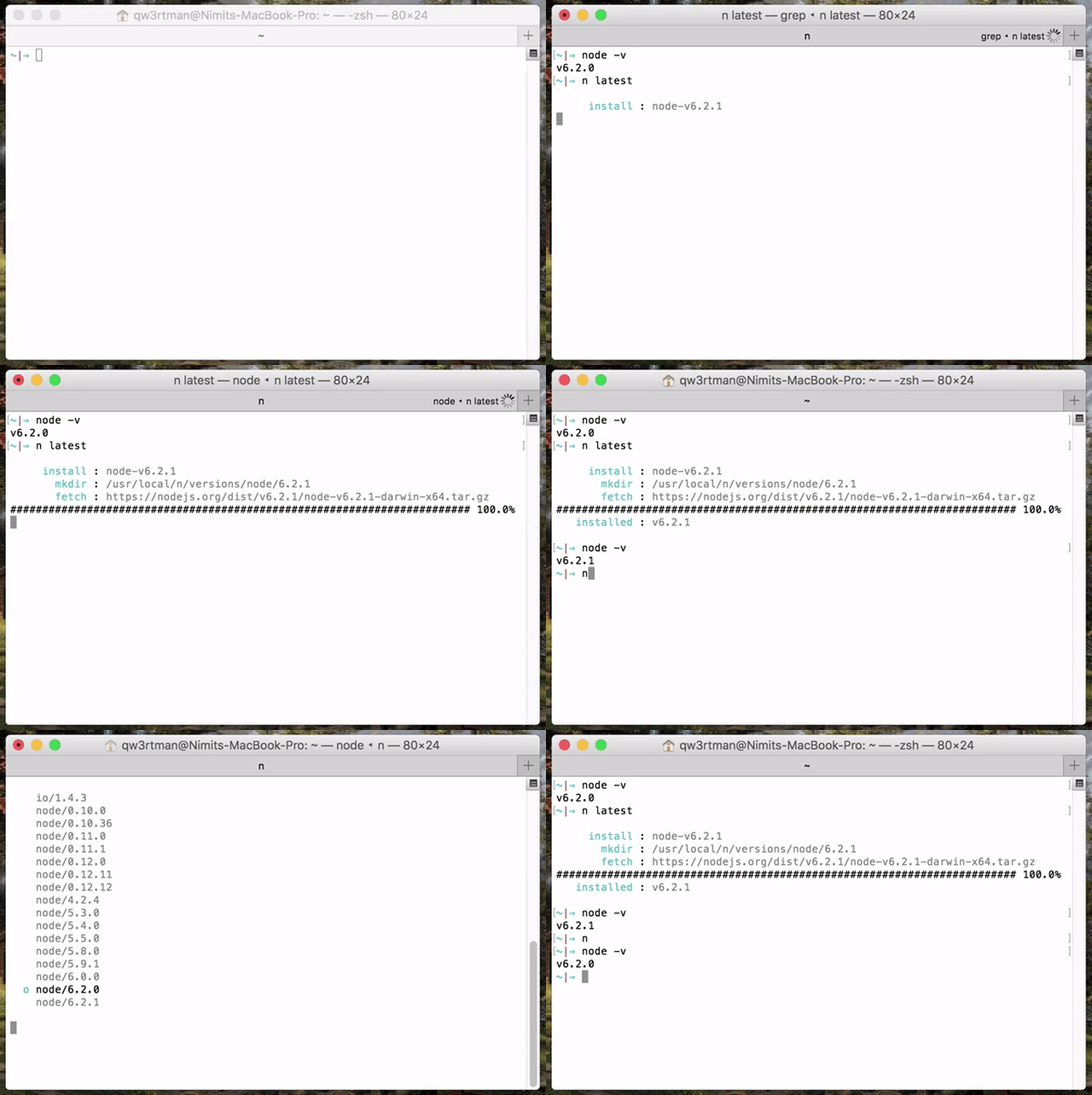\n\n(Note: `n` is not supported natively on Windows.)\n\n- [`n` – Interactively Manage Your Node.js Versions](#n-%e2%80%93-interactively-manage-your-nodejs-versions)\n - [Installation](#installation)\n - [Third Party Installers](#third-party-installers)\n - [Installing Node Versions](#installing-node-versions)\n - [Specifying Node Versions](#specifying-node-versions)\n - [Removing Versions](#removing-versions)\n - [Using Downloaded Node Versions Without Reinstalling](#using-downloaded-node-versions-without-reinstalling)\n - [Miscellaneous](#miscellaneous)\n - [Custom Source](#custom-source)\n - [Custom Architecture](#custom-architecture)\n - [Optional Environment Variables](#optional-environment-variables)\n - [How It Works](#how-it-works)\n\n## Installation\n\nSince you probably already have `node`, the easiest way to install `n` is through `npm`:\n\n npm install -g n\n\nOnce installed, `n` caches `node` versions in subdirectory `n/versions` of the directory specified in environment variable `N_PREFIX`, which defaults to `/usr/local`; and the _active_ `node` version is installed directly in `N_PREFIX`.\n\nTo avoid requiring `sudo` for `n` and `npm` global installs, it is suggested you either install to your home directory using `N_PREFIX`, or take ownership of the system directories:\n\n # make cache folder (if missing) and take ownership\n sudo mkdir -p /usr/local/n\n sudo chown -R $(whoami) /usr/local/n\n # take ownership of node install destination folders\n sudo chown -R $(whoami) /usr/local/bin /usr/local/lib /usr/local/include /usr/local/share\n\n-----\n\nIf `npm` is not yet available, one way to bootstrap an install:\n\n curl -L https://raw.githubusercontent.com/tj/n/master/bin/n -o n\n bash n lts\n # Now node and npm are available\n\nAlternatively, you can clone this repo and\n\n make install\n\nto install `n` to `bin/n` of the directory specified in the environment variable `$PREFIX`, which defaults to `/usr/local` (note that you will likely need to use `sudo`). To install `n` in a custom location (such as `$CUSTOM_LOCATION/bin/n`), run `PREFIX=$CUSTOM_LOCATION make install`.\n\n### Third Party Installers\n\nOn macOS with [Homebrew](https://brew.sh/) you can install the [n formula](https://github.com/Homebrew/homebrew-core/blob/master/Formula/n.rb).\n\n brew install n\n\nOn Linux and macOS, [n-install](https://github.com/mklement0/n-install) allows installation directly from GitHub; for instance:\n\n curl -L https://git.io/n-install | bash\n\nn-install sets both `PREFIX` and `N_PREFIX` to `$HOME/n`, installs `n` to `$HOME/n/bin`, modifies the initialization files of supported shells to export `N_PREFIX` and add `$HOME/n/bin` to the `PATH`, and installs the latest LTS `node` version.\n\nAs a result, both `n` itself and all `node` versions it manages are hosted inside a single, optionally configurable directory, which you can later remove with the included `n-uninstall` script. `n-update` updates `n` itself to the latest version. See the [n-install repo](https://github.com/mklement0/n-install) for more details.\n\n## Installing Node Versions\n\nSimply execute `n <version>` to download and install a version of `node`. If `<version>` has already been downloaded, `n` will install from its cache.\n\n n 10.16.0\n n lts\n\nExecute `n` on its own to view your downloaded versions, and install the selected version.\n\n $ n\n\n node/4.9.1\n ο node/8.11.3\n node/10.15.0\n\n Use up/down arrow keys to select a version, return key to install, d to delete, q to quit\n\n(You can also use `j` and `k` to navigate up or down without using arrows.)\n\nIf the active node version does not change after install, try opening a new shell in case seeing a stale version.\n\n## Specifying Node Versions\n\nThere are a variety of ways of specifying the target node version for `n` commands. Most commands use the latest matching version, and `n ls-remote` lists multiple matching versions.\n\nNumeric version numbers can be complete or incomplete, with an optional leading `v`.\n\n- `4.9.1`\n- `8`: 8.x.y versions\n- `v6.1`: 6.1.x versions\n\nThere are labels for two especially useful versions:\n\n- `lts`: newest Long Term Support official release\n- `latest`, `current`: newest official release\n\nThere is support for release streams:\n\n- `argon`, `boron`, `carbon`: codenames for LTS release streams\n\nThe last form is for specifying [other releases](https://nodejs.org/download) available using the name of the remote download folder optionally followed by the complete or incomplete version.\n\n- `chakracore-release/latest`\n- `nightly`\n- `test/v11.0.0-test20180528`\n- `rc/10`\n\n## Removing Versions\n\nRemove some cached versions:\n\n n rm 0.9.4 v0.10.0\n\nRemoving all cached versions except the current version:\n\n n prune\n\nRemove the installed node and npm (does not affect the cached version). This can be useful\nto revert to the system version of node (if in a different location), or if you no longer\nwish to use node and npm, or are switching to a different way of managing them.\n\n n uninstall\n\n## Using Downloaded Node Versions Without Reinstalling\n\nThere are three commands for working directly with your downloaded versions of `node`, without reinstalling.\n\nYou can show the path to the downloaded version:\n\n $ n which 6.14.3\n /usr/local/n/versions/6.14.3/bin/node\n\nOr run a downloaded `node` version with the `n run` command:\n\n n run 8.11.3 --debug some.js\n\nOr execute a command with `PATH` modified so `node` and `npm` will be from the downloaded `node` version.\n(NB: this `npm` will be working with a different and empty global node_modules directory, and you should not install global\nmodules this way.)\n\n n exec 10 my-script --fast test\n\n## Miscellaneous\n\nCommand line help can be obtained from `n --help`.\n\nList matching remote versions available for download:\n\n n ls-remote lts\n n ls-remote latest\n n lsr 10\n n --all lsr\n\nList downloaded versions in cache:\n\n n ls\n\nDisplay diagnostics to help resolve problems:\n\n n doctor\n\n## Custom Source\n\nIf you would like to use a different node mirror which has the same layout as the default <https://nodejs.org/dist/>, you can define `N_NODE_MIRROR`.\nThe most common example is users in China can define:\n\n export N_NODE_MIRROR=https://npm.taobao.org/mirrors/node\n\nThere is also `N_NODE_DOWNLOAD_MIRROR` for a different mirror with same layout as the default <https://nodejs.org/download>\n\n## Custom Architecture\n\nBy default `n` picks the binaries matching your system architecture, e.g. `n` will download 64 bit binaries for a 64 bit system. You can override this by using the `-a` or `--arch` option.\n\nDownload and use latest 32 bit version of `node`:\n\n n --arch x86 latest\n\n## Optional Environment Variables\n\nThe `n` command downloads and installs to `/usr/local` by default, but you may override this location by defining `N_PREFIX`.\nTo change the location to say `$HOME/.n`, add lines like the following to your shell initialization file:\n\n export N_PREFIX=$HOME/.n\n export PATH=$N_PREFIX/bin:$PATH\n\n`n` defaults to using xz compressed node tarballs for the download if it is likely tar on the system supports xz decompression.\nYou can override the automatic choice by setting an environment variable to zero or non-zero:\n\n export N_USE_XZ=0 # to disable\n export N_USE_XZ=1 # to enable\n\nYou can be explicit to get the desired behaviour whatever the environment variable:\n\n n install --use-xz nightly\n n install --no-use-xz latest\n\nIn brief:\n\n- `N_NODE_MIRROR`: See [Custom source](#custom-source)\n- `N_NODE_DOWNLOAD_MIRROR`: See [Custom source](#custom-source)\n- support for [NO_COLOR](http://no-color.org) and [CLICOLOR=0](https://bixense.com/clicolors) for controlling use of ANSI color codes\n- `N_MAX_REMOTE_MATCHES` to change the default `ls-remote` maximum of 20 matching versions\n\n## How It Works\n\n`n` downloads a prebuilt `node` package and installs to a single prefix (e.g. `/usr/local`). This overwrites the previous version. The `bin` folder in this location should be in your `PATH` (e.g. `/usr/local/bin`).\n\nThe downloads are kept in a cache folder to be used for reinstalls. The downloads are also available for limited use using `n which` and `n run` and `n exec`.\n\nThe global `npm` packages are not changed by the install, with the\nexception of `npm` itself which is part of the `node` install.\n", "readmeFilename": "README.md", "_id": "n@6.2.0", "dist": { "shasum": "b9e4fb95de62a96d05b4cb1a72600d7d4daab3be" }, "_from": "n@", "_resolved": "https://registry.npmjs.org/n/-/n-6.2.0.tgz" }
[+]
bin
[+]
..
[-] package.json
[edit]
[-] README.md
[edit]